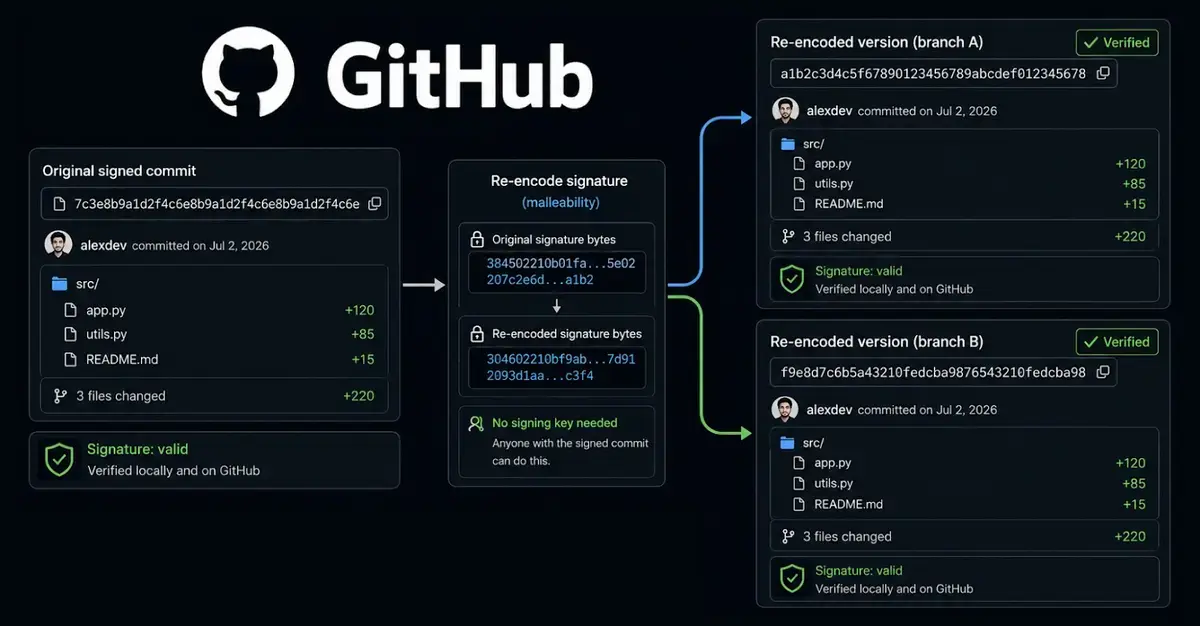
Recreating a Commit While Preserving Its Signature
The team explained that Git’s object model stores the commit’s metadata and a SHA‑1 identifier, but the signature only covers the data, not the hash itself. By reproducing the exact tree, author fields and commit date, a malicious actor can compute a new hash while preserving the original PGP signature block. GitHub’s verification logic, which checks the signature against the commit’s contents, does not re‑hash the new identifier, allowing the forged commit to retain the „Verified” label. The researchers demonstrated the technique on several open‑source repositories, showing that the attack works across typical workflows and does not require repository maintainer access.
Latest news
 The iPhone Duo Reimagines Smartphone Navigation
 Improper Redaction Exposes Google Data Center Resource Use in Lincoln
 I fed my messy Obsidian notes to Claude Code and it finally organized my digital brain
 Your Wi‑Fi Performance Is Suffering From a Simple Mistake
To perform the rewrite, the attacker clones the target repository and extracts the signed commit’s payload. Using the same author name, email and timestamp, they rebuild the commit object and sign it with a newly generated PGP key that matches the original key ID. Because the signature block includes the key ID, GitHub accepts the signature as long as the key ID matches the one stored on the platform. The new commit receives a different SHA‑1 hash, but the visual badge remains unchanged. The researchers noted that the process can be automated, making large‑scale supply‑chain tampering feasible if an attacker can insert a malicious version of a package downstream.
Is the ‘Verified’ Label Still Reliable for Developers?
GitHub’s „Verified” badge has become a shorthand for trust in the open‑source community. This discovery raises doubts about its reliability, especially for projects that depend on automated security scans. While the platform still validates that the signature matches the stored key, it does not detect that the underlying commit hash has been altered. Security teams may need to supplement badge checks with additional provenance tools that record immutable hashes outside of Git’s native structures. Until GitHub updates its verification algorithm, developers should treat the badge as an indicator of a valid signature, not as proof that the commit content is untouched.
The implications for software supply‑chain security are significant. Attackers could insert malicious code into a trusted repository, re‑sign the commit, and evade detection by tools that only look for the „Verified” flag. Industry experts recommend adopting reproducible builds and hash‑pinning of dependencies to mitigate such risks. GitHub has acknowledged the findings and indicated that a patch is under development, but the timeline remains uncertain. In the meantime, organizations must reassess their reliance on Git signatures alone and consider layered verification strategies.
Can an attacker forge a commit without the original private key? Yes. By recreating the commit’s metadata and using a new key that shares the same key ID, the attacker can produce a valid signature that GitHub accepts.
Frequently Asked Questions
Does the „Verified” badge guarantee that the code has not been altered? No. The badge confirms that a signature matches a stored key, but it does not ensure the commit hash is unchanged. Additional checks are needed for full integrity assurance.
What steps can developers take to protect against this vulnerability? Implement reproducible builds, pin dependency hashes, and use external provenance services that record immutable commit identifiers beyond Git’s native verification.
Comments
Leave a comment