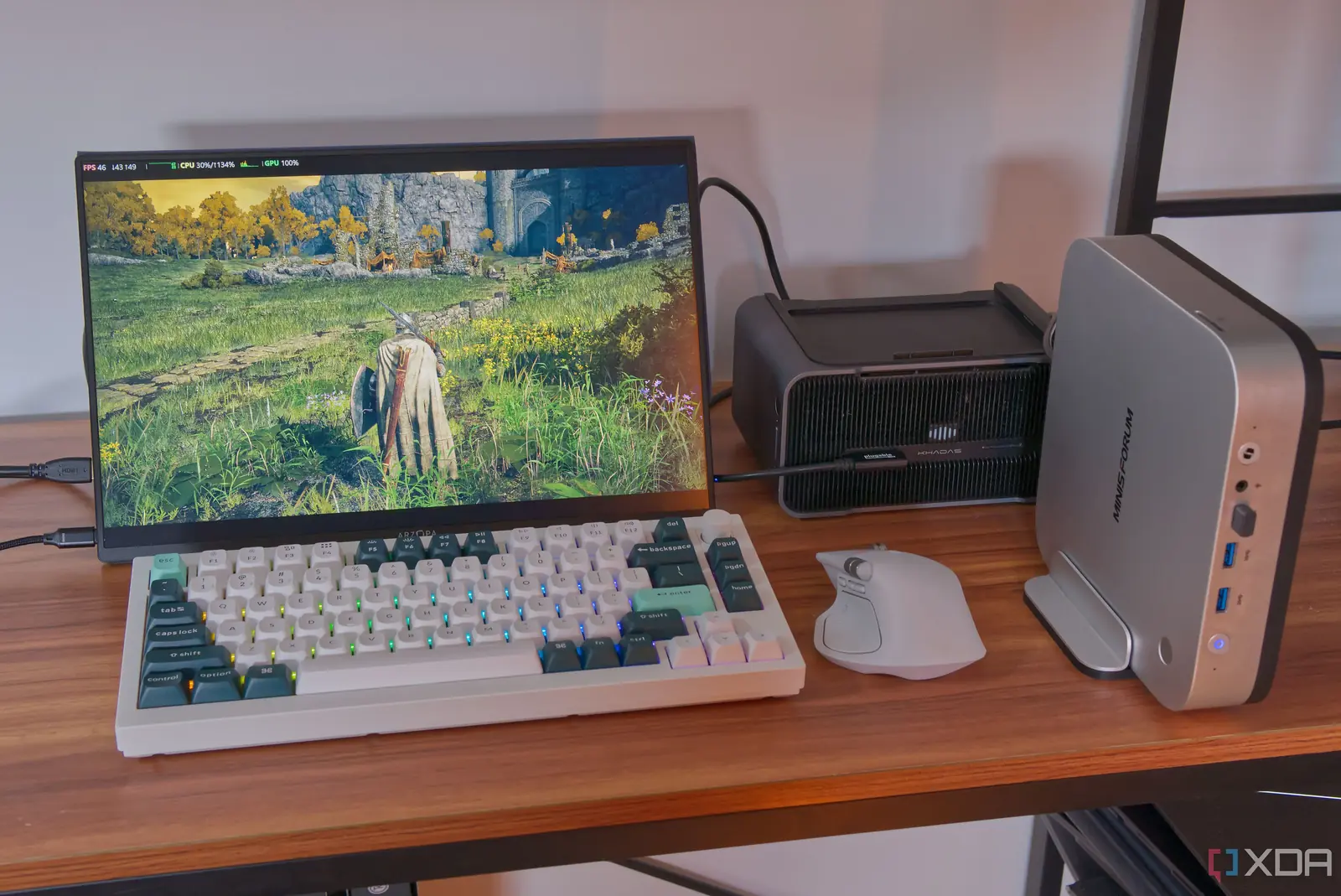
How Single-Cable Connectivity Changes Mini PC Gaming
A recent hardware experiment demonstrates that a standard desktop graphics card can now connect to a compact mini PC using only a single cable. This development challenges long-held assumptions about the physical limitations of small form factor computing. The setup allows users to leverage high-performance external GPUs without complex internal modifications or bulky docking stations. This innovation targets gamers and power users who prefer the space-saving benefits of mini PCs but desire the graphical fidelity of full-sized desktops. The connection method simplifies what was previously a cumbersome process involving multiple ports and adapters.
Latest news
 Why the Rumored iPhone Duo Excites Android Foldable Fans
 AMD's Canceled Ryzen 9 5900X3D Leaks Online
 California Subpoenas OpenAI Over Autonomous AI Hacking Risks
 Nvidia-Backed UK Supercomputer Faces Multi-Year Power Delay
The core of this advancement lies in new connectivity standards that support high bandwidth through a unified interface. Previously, connecting an external GPU required separate cables for video output and power delivery, often creating a tangled mess behind the computer case. Now, a single high-speed cable handles both data transfer and necessary electrical requirements. This streamlines the user experience significantly. It reduces desk clutter and makes the system easier to transport. The technology bridges the gap between portability and raw computational power. Users no longer need to choose between a small footprint and strong graphics performance. They can maintain a clean workspace while running demanding applications like modern video games or professional rendering software.
Does This Setup Replace Traditional Desktops?
The integration of desktop-class GPUs into mini systems relies on advanced signal processing and power management protocols. These protocols ensure that the external graphics unit receives sufficient energy to operate at peak efficiency. Simultaneously, the video signal travels back to the display without noticeable latency or quality loss. This is critical for competitive gaming where milliseconds matter. The mini PC acts as the central processing hub, handling logic and memory tasks. The external GPU takes over the heavy lifting for visual rendering. This division of labor optimizes resource usage across both devices. It allows the mini PC to remain cool and quiet during intense graphical workloads. The heat generated by the powerful GPU stays external, preventing thermal throttling inside the compact chassis. This design philosophy extends the lifespan of the internal components by reducing their thermal load.
While this configuration offers impressive flexibility, it does not entirely replace traditional tower PCs for every user. The primary advantage remains the significant reduction in physical space required on a desk. For professionals working in small offices or living in compact apartments, this setup is ideal. However, enthusiasts seeking maximum upgrade paths might still prefer larger cases. Those cases allow for multiple expansion slots and larger cooling solutions. Nevertheless, the single-cable solution removes the biggest barrier to entry for many potential buyers. It makes high-end gaming accessible without the need for a large, noisy tower. The market is shifting toward modular designs that prioritize ease of use. Manufacturers are responding to consumer demand for cleaner aesthetics and simpler maintenance. As these technologies mature, we expect to see more integrated solutions that further blur the line between laptop, mini PC, and desktop performance.
Can any desktop GPU work with a mini PC via one cable? Not all GPUs are compatible immediately. The specific model must support the latest high-bandwidth connectivity standard used by the mini PC. Users should verify compatibility lists before purchasing to ensure the hardware supports the single-cable protocol.
Frequently Asked Questions
Does this setup require extra power bricks? Typically, the single cable transmits enough power for most mid-range and high-end cards. However, extremely high-power GPUs might still benefit from an additional dedicated power input to reach their absolute maximum clock speeds.
Is the performance identical to a built-in GPU? Performance is very close but may vary slightly due to external signal transmission overhead. In practical terms, the difference is negligible for most gaming and creative tasks. Users will not notice a drop in frame rates during normal usage scenarios.
Comments
Leave a comment