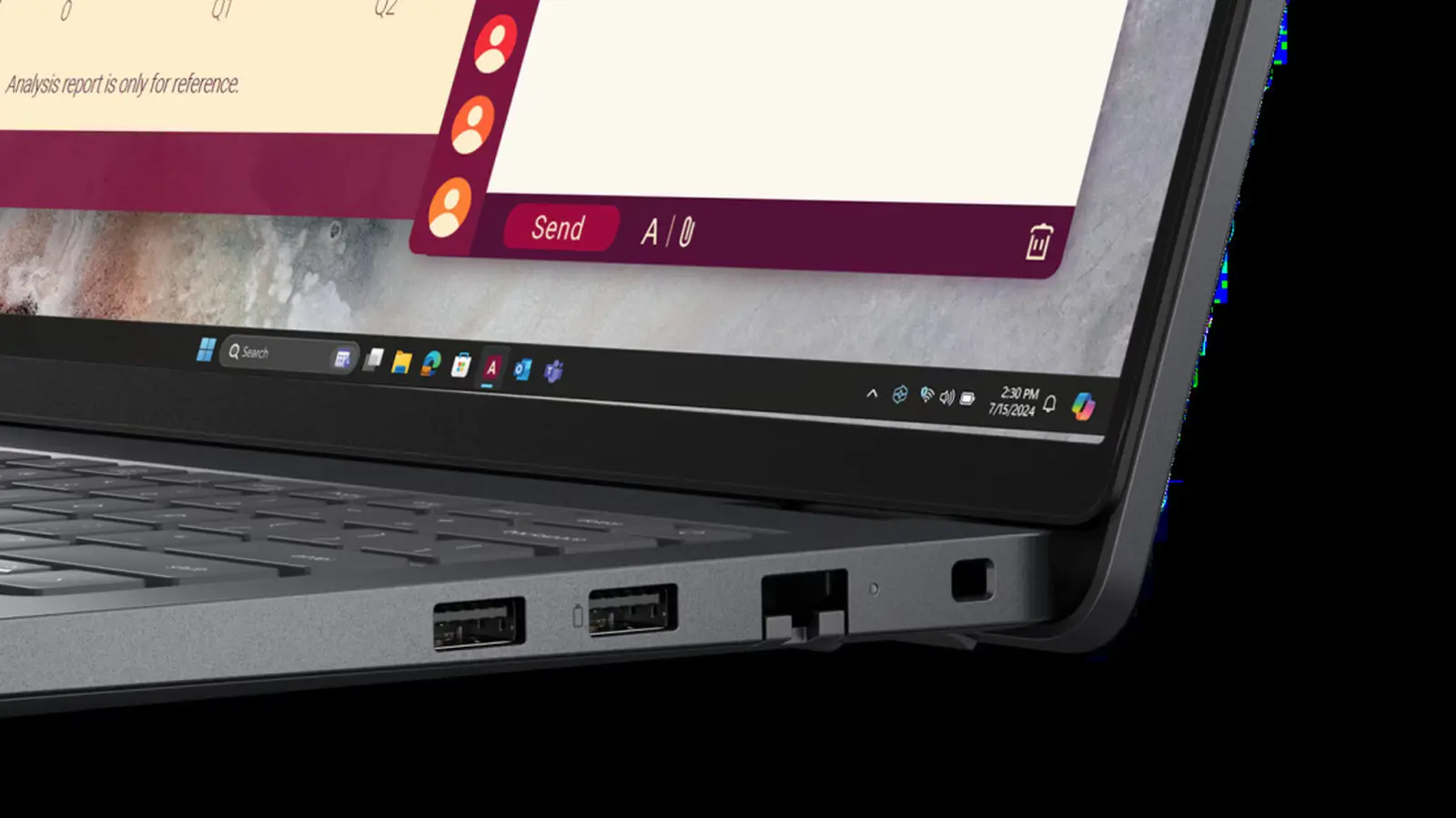
How the Battery Symbol Reflects Charging Technology
The battery symbol next to a USB port indicates enhanced charging capabilities, commonly found on laptops, monitors, and docking stations. It signals that the port supports faster charging speeds and may allow bi-directional power flow, meaning it can charge connected devices or draw power from them. This feature is especially useful for users who need to quickly power smartphones, tablets, or other peripherals without relying on wall adapters. The symbol helps distinguish these ports from standard USB connections that only handle data transfer or low-power charging.
Latest news
 Apple Releases Third Beta of macOS Golden Gate 27.2 for Developer Testing
 AirPods Pro 3 vs AirPods Pro 2: Three reasons to upgrade
 TP‑Link Archer BE3600 Drops to Record Low Price
 Nintendo Switch 2 hits record low price of £354.99
Ports marked with a battery icon often support higher power delivery, such as USB Power Delivery (USB-PD) standards, enabling voltages up to 20W or more. This allows for rapid charging of compatible devices, significantly reducing wait times compared to conventional USB ports. In some cases, the symbol also indicates that the port can reverse its power flow—for example, using a laptop’s battery to charge a phone when the system is off or in sleep mode. Manufacturers like Dell and Lenovo frequently include this labeling to guide users toward optimal charging options, improving convenience and efficiency in multi-device setups.
What Devices Benefit Most from These Ports?
Users who frequently charge mobile devices while working on a laptop gain the most from battery-symbol USB ports. Professionals in fields like design, engineering, or remote work often rely on these ports to keep phones, tablets, or portable monitors powered throughout the day. The ability to charge devices directly from a laptop reduces clutter and dependency on multiple chargers. Additionally, bi-directional functionality can be valuable in emergencies, such as using a laptop’s reserve power to make an urgent call when no outlet is available. This versatility enhances the practicality of modern computing hardware in dynamic environments.
Does the battery symbol mean the port can charge devices when the laptop is off? Yes, in many cases, ports with this symbol remain powered even when the system is shut down or in sleep mode, allowing continuous charging.
Frequently Asked Questions
Is a battery-symbol USB port the same as a Thunderbolt port? Not necessarily. While some Thunderbolt ports include the battery symbol and support high power delivery, the symbol alone does not confirm Thunderbolt capability—it primarily indicates enhanced charging features.
Can I use any USB cable with a battery-symbol port for fast charging? To achieve maximum charging speed, a USB-C cable that supports Power Delivery is required. Standard cables may not handle the higher power levels safely or efficiently.
Comments
Leave a comment