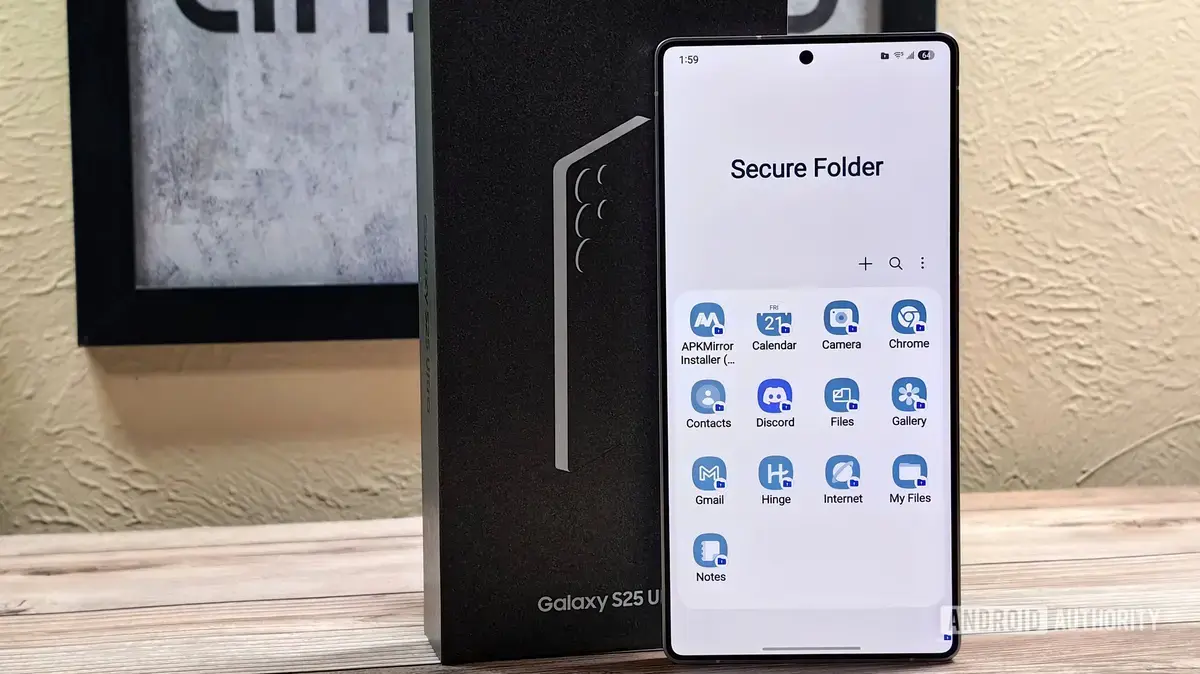
Managing Multiple Digital Personas
Samsung Galaxy users often view the Secure Folder as a digital vault for sensitive documents or private images. However, this built-in security feature offers versatility that extends far beyond simple encryption. By leveraging its unique environment, users can significantly improve their device organization and daily productivity starting today.
Latest news
 Anthropic Unveils Claude Duet For Background AI Tasks
 Eiliko Creator Hires Independent Security Firm After Flawy Robot Charm Exposed
 Musk Compares Optimus Robot Training to Raising a Toddler
 Atari VCS Software Store Closes in February 2027
The Secure Folder functions as a sandbox, creating a completely isolated space within your phone. Because it operates independently of the main operating system, it allows you to run duplicate versions of applications. This separation ensures that your personal data remains untouched by the software running inside the protected partition.
One of the most practical uses for this feature is running dual accounts for messaging or social media apps. You can maintain a separate WhatsApp or Telegram account within the folder without needing a second device. This keeps your professional and personal communications strictly divided, preventing accidental cross-posting or notification clutter.
Could This Simplify Your Daily Workflow?
You can also use the folder to test unverified apps without risking your primary data. If an application seems suspicious or requires excessive permissions, installing it inside the Secure Folder provides a safety net. If the app causes issues, you can simply delete the folder instance without affecting your main system.
Many power users utilize the Secure Folder to hide sensitive files that they still need to access quickly. Instead of burying documents in deep file directories, you can keep them in this encrypted space. It provides a clean, clutter-free experience for your primary home screen while keeping important assets just a few taps away.
Frequently Asked Questions
Furthermore, you can use the folder to manage secondary email accounts that you do not want syncing with your main calendar or contacts. This helps maintain a cleaner digital footprint across your device. As mobile security becomes increasingly vital, mastering these hidden features will help you maintain both privacy and efficiency.
Can I use the same app in both the main storage and the Secure Folder? Yes, the folder allows you to install a separate instance of any app. This means you can have two distinct accounts for the same service running simultaneously on one phone.
Does the Secure Folder impact my phone's battery life? The feature has a negligible effect on battery performance. It only consumes resources when you are actively using the applications stored inside the protected environment.
Comments
Leave a comment