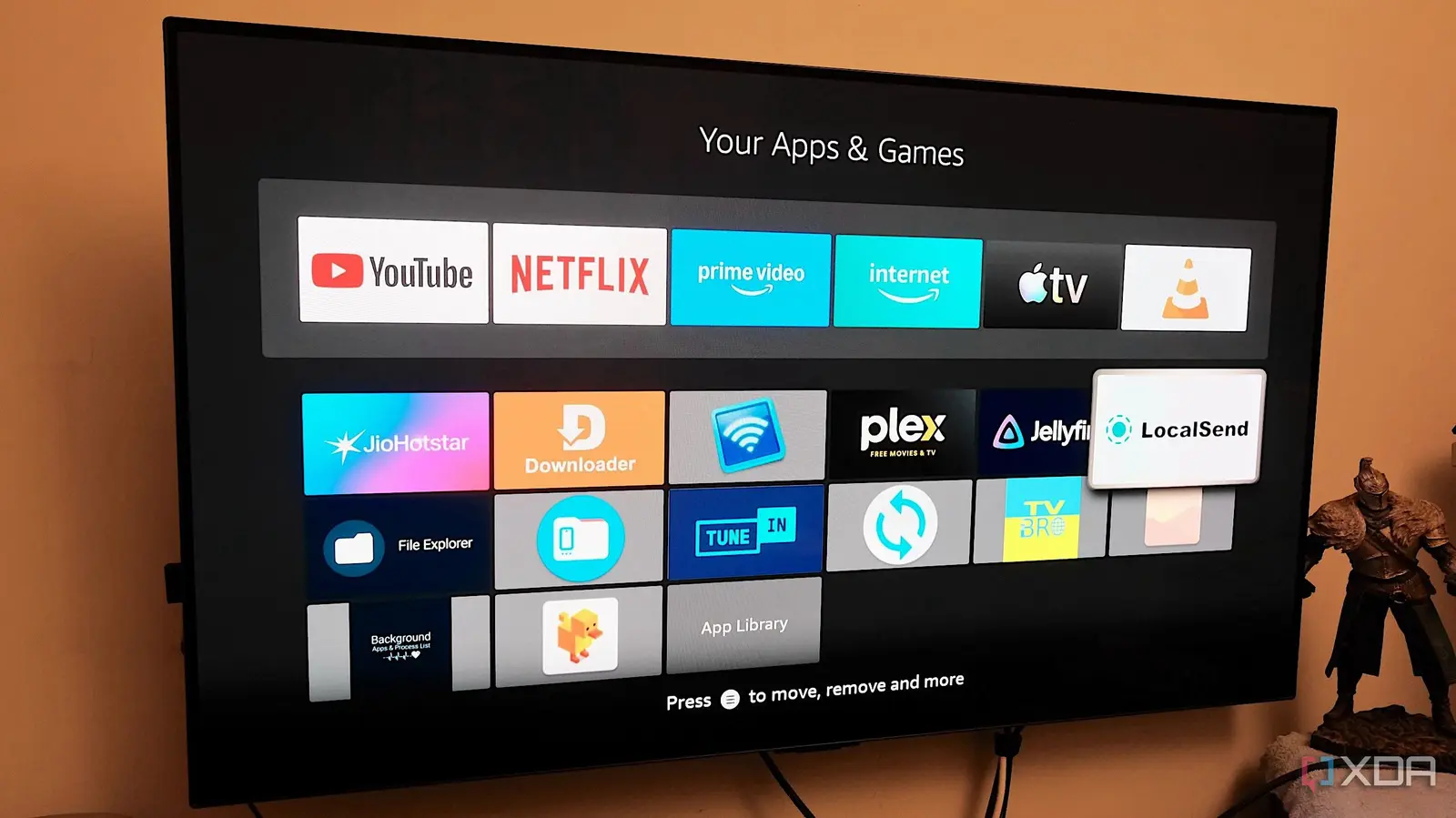
By leveraging the Fire TV Stick’s Android-based operating system
Samir Makwana, a technology journalist with nearly two decades of experience covering gadgets and software, recently shifted his perspective on the Amazon Fire TV Stick after discovering a range of free applications that extend its functionality far beyond video streaming. Published on September 18, 2026, his insight highlights how users can repurpose the popular streaming stick into a versatile tool for everyday tasks using readily available apps from the Amazon Appstore. The shift began when Makwana explored utility applications designed for the Fire TV interface, uncovering tools that enable file management, screen mirroring from smartphones, and even basic computing functions. These apps, many of which are free, allow users to browse local networks, access USB storage devices connected via adapters, and control smart home devices directly from the TV screen.
Latest news
 Why the Rumored iPhone Duo Excites Android Foldable Fans
 AMD's Canceled Ryzen 9 5900X3D Leaks Online
 California Subpoenas OpenAI Over Autonomous AI Hacking Risks
 Nvidia-Backed UK Supercomputer Faces Multi-Year Power Delay
By leveraging the Fire TV Stick’s Android-based operating system, these applications unlock capabilities typically associated with mini PCs or tablets, all through a familiar remote control interface. Turning Your TV Into a Secondary Workspace One of the most practical discoveries was the ability to use file explorer apps like X-plore File Manager or Solid Explorer to navigate folders on external drives or network-attached storage. This transforms the television into a convenient hub for viewing photos, playing local media files, or accessing documents without needing a computer.
Makwana noted that pairing a Bluetooth keyboard and mouse significantly
Makwana noted that pairing a Bluetooth keyboard and mouse significantly improves usability, effectively turning the setup into a lightweight workstation for light productivity tasks such as editing spreadsheets or drafting emails through web-based office suites accessed via the Silk Browser. Can a Streaming Stick Replace a Tablet for Light Use? While not intended to replace full-featured computing devices, the Fire TV Stick, when augmented with these apps, proves surprisingly capable for casual use. Users report success in using screen mirroring apps like AirScreen or Miracast to display content from Android or Windows devices, enabling presentations or photo slideshows on a larger screen. Additionally, apps that integrate with smart home ecosystems allow control of lights, thermostats, and cameras directly from the Fire TV interface, reducing reliance on separate voice assistants or smartphone apps. These functions are particularly useful in shared living spaces or bedrooms where a dedicated tablet might be impractical.
The broader implication is that affordable streaming hardware, often purchased solely for entertainment, can serve as a multi-functional device with minimal additional cost. As more developers optimize apps for the Fire TV platform, the line between streaming stick and compact computing device continues to blur. For budget-conscious consumers or those seeking to maximize existing hardware, exploring these utility applications offers a tangible way to enhance daily digital interactions without investing in new technology. Frequently Asked Questions What kinds of free apps can turn a Fire TV Stick into a productivity tool? Free file managers, screen mirroring utilities, and smart home control apps available in the Amazon Appstore enable functions like browsing external storage, mirroring smartphone screens, and managing connected devices directly from the TV interface. Do I need additional hardware to use these productivity features?
While many apps work with just the remote, pairing a Bluetooth keyboard and mouse greatly improves usability for tasks like document editing or web browsing, making the experience more efficient and laptop-like. Can the Fire TV Stick handle tasks typically done on a tablet? For light use such as viewing photos, accessing cloud services via a browser, or controlling smart home devices, the Fire TV Stick performs adequately, though it is not suited for intensive applications or multitasking beyond basic levels.
Comments
Leave a comment