How Secure is Your Software?
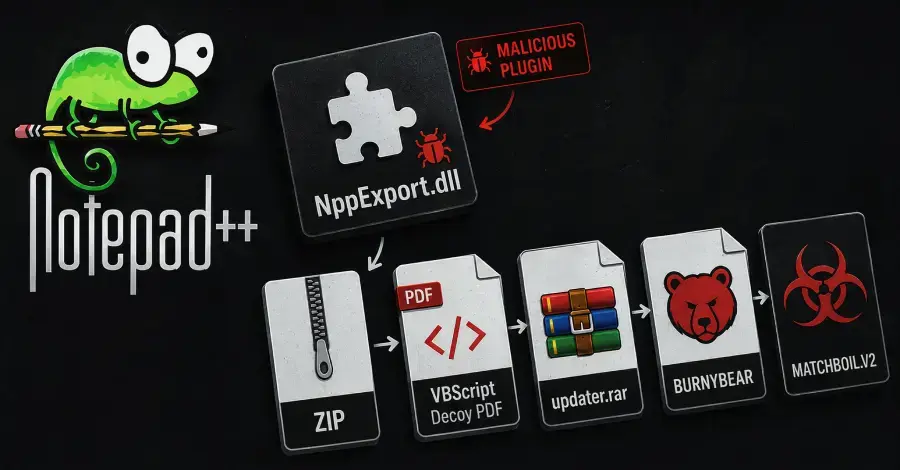
Ukraine's Computer Emergency Response Team (CERT-UA) has warned of a new cyber campaign targeting Windows systems. The threat cluster, tracked as UAC-0099, is using a fake Notepad++ plugin to compromise systems. The campaign was detected in recent attacks.
Latest news
 The iPhone Duo Reimagines Smartphone Navigation
 Improper Redaction Exposes Google Data Center Resource Use in Lincoln
 I fed my messy Obsidian notes to Claude Code and it finally organized my digital brain
 Your Wi‑Fi Performance Is Suffering From a Simple Mistake
The malicious program is disguised as a Notepad++ plugin, a popular text editor used by many Windows users. By using a legitimate software's name, the attackers are trying to evade detection. CERT-UA attributed the activity to UAC-0099, a threat cluster it has been monitoring.
Can Legitimate Software be Used as a Trojan Horse?
The attackers' tactics highlight the risks associated with downloading software from untrusted sources. Notepad++ is a widely used text editor, making it an attractive target for attackers. The fake plugin delivers the MATCHBOIL. V2 malware, allowing the attackers to gain unauthorized access to compromised systems.
The use of a fake Notepad++ plugin demonstrates the evolving tactics of threat actors. By masquerading as legitimate software, they increase the chances of their malware being installed on unsuspecting users' systems. The CERT-UA warning serves as a reminder to users to be cautious when downloading software.
The incident raises concerns about the security of software downloads. Users often rely on plugins and add-ons to enhance their software's functionality, but this can also be exploited by attackers.
Frequently Asked Questions
The consequences of such attacks can be severe, with compromised systems potentially being used for espionage or other malicious activities. As threat actors continue to evolve their tactics, users must remain vigilant when downloading software.
What is the MATCHBOIL. V2 malware? MATCHBOIL. V2 is a malicious program delivered through a fake Notepad++ plugin, allowing attackers to gain unauthorized access to compromised systems. How can users protect themselves? Users can protect themselves by only downloading software from trusted sources and being cautious when installing plugins or add-ons. What should I do if I've installed the fake Notepad++ plugin? If you have installed the fake plugin, immediately remove it and run a virus scan on your system to detect and remove any malware.
Comments
Leave a comment